Add a lead
Who it’s for: Salespeople
Where: Pipeline → + New lead
Before you start: Permission to create leads, and the inquiry details.
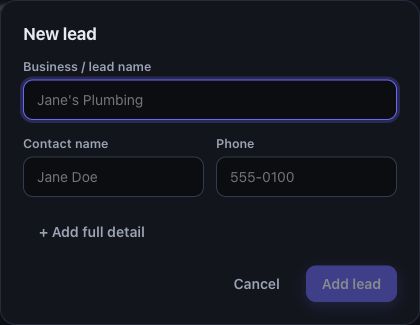
The compact form starts with a name and basic contact details.
- Open Pipeline and choose + New lead.
- Enter the Business / lead name, Contact name and Phone details you know. Choose an existing business or contact when appropriate.
- Choose + Add full detail to add an email address, lead type, source or other profile details.
- Choose Add lead.
- If Looks like a duplicate of… appears, open the suggested record and compare it. Use Create anyway only when a separate record is intended.
- Find the new record in Leads and review its profile.
You’ll know it worked when…
Section titled “You’ll know it worked when…”The lead opens from the Leads list with the saved details.
Notes & limits
Section titled “Notes & limits”- New leads do not appear on the engaged Pipeline board until contact begins or their stage changes.
- When you select an existing contact, their details are reused; edit the person on their contact record when needed.
- For a batch, use Import leads from CSV.