Invite and manage teammates
Who it’s for: Managers and authorized team administrators
Where: Sidebar → Team
Before you start: Permission to manage users.
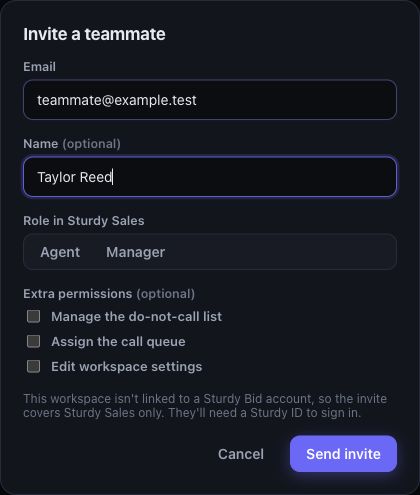
Example workspace with sample data.
- Open Team and choose Invite teammate.
- Enter the person’s email, optional name and Role in Sturdy Sales. Choose only the extra permissions they need.
- If access to other Sturdy products is offered, review it separately before submitting the invitation.
- Check the teammate’s resulting state and any warning. If the roster says No Sturdy ID, choose Invite link and give the one-time link directly to that teammate. Have them complete sign-in before treating access as ready.
- To remove access, open the teammate’s disable action and review their open work. Transfer that work to a suitable teammate when prompted.
You’ll know it worked when…
Section titled “You’ll know it worked when…”The roster shows the intended role and access state. After the teammate signs in, verify they can reach the expected workspace.
Notes & limits
Section titled “Notes & limits”- A roster entry alone does not prove the person can sign in. Check invitation errors and the Sturdy ID link state.
- Only a manager can grant the manager role. The last active manager is protected.
- Disabling Sales access and removing access to other products are separate actions.
- Do not share invitation links outside the intended recipient.